
In the fast-paced world of technology, it’s easy to accumulate digital clutter over time. Old computers often become virtual dumping grounds for outdated files, unused software, and forgotten folders. Decluttering your computer not only enhances its performance but also helps you regain control of your digital space. In this guide, we’ll walk you through the steps to declutter old computers and breathe new life into it. Plus, I’ll cover what to do with an old computer you no longer want.
Welcome to the Year Long Thorough Declutter Series! We will be starting decluttering specific tasks. Each day is dedicated to spending only 30 minutes decluttering your specific daily task. We will be working 5 days a week, so you can take 2 days to enjoy time with your loved ones.
Also, you can get the complete digital printable copy of the Year Long Thorough Declutter Series Calendar and Checklists here. The printable digital download is delivered to your email. It includes 25 pages of printable calendar pages and checklists to help you declutter every room in your home. You can sign up here.
Struggling with the daily housekeeping chores? Check out my ebook on this topic, entitled Make Over Your Homemaking. Use this link to get it at a discounted price.

Revitalizing Your Digital Space: A Guide on How to Declutter Old Computers
Step 1: Back Up Your Data
Before diving into the decluttering process, it’s crucial to back up your important files. Use an external hard drive, cloud storage, or a combination of both to ensure that your valuable data is safe in case anything goes wrong during the decluttering process.
Step 2: Assess and Organize Files
Start by going through your files and categorizing them. Create folders for documents, pictures, videos, and other types of files. Delete duplicate files and organize everything into a logical and easy-to-navigate structure. This step will not only declutter your computer but also make it more efficient to find what you need.
Step 3: Uninstall Unused Programs
Over time, we tend to accumulate a plethora of programs and applications that we no longer use. Go through your list of installed programs and uninstall anything that you haven’t used in the past six months to a year. This not only frees up valuable storage space but also streamlines your computer’s performance.
Step 4: Clean Up Desktop and Downloads Folder
A cluttered desktop and a Downloads folder filled with random files can slow down your computer. Sort through your desktop icons, delete unnecessary shortcuts, and organize the remaining ones into folders. Similarly, clean out your Downloads folder by moving important files to appropriate folders and deleting unnecessary downloads.
Step 5: Clear Browser Cache and Cookies
Web browsers accumulate a significant amount of temporary files, cache, and cookies over time. Clearing these not only improves your browser’s performance but also frees up storage space. Go into your browser settings and clear the cache and cookies regularly to keep your browsing experience smooth.

Step 6: Run Disk Cleanup and Disk Defragmenter
Most operating systems come with built-in tools like Disk Cleanup and Disk Defragmenter. Disk Cleanup helps remove temporary files, system files, and other unnecessary items, while Disk Defragmenter reorganizes data on your hard drive for better performance. Run these utilities regularly to keep your computer running efficiently.
Step 7: Update Software and Operating System
Ensure that your operating system and all installed software are up-to-date. Updates often include performance improvements, bug fixes, and security patches. Keeping everything current not only enhances your computer’s performance but also protects it from potential security threats.
Step 8: Consider Upgrading Hardware
As you declutter old computers you may notice a speed issue. If your computer is still sluggish after decluttering and optimizing software, it may be time to consider upgrading hardware components. Adding more RAM, upgrading to a solid-state drive (SSD), or replacing an old hard drive can significantly improve performance and extend the life of your computer.
Learning how to declutter old computers is a rewarding process that not only improves its performance but also helps you maintain a more organized digital life. By following these steps, you’ll be able to reclaim valuable storage space, enhance efficiency, and enjoy a faster, more responsive computer experience. Remember to make decluttering a regular habit to keep your digital space organized and your computer running smoothly.
Tips to Declutter Old Computers: Maybe you are replacing your computer and wondering what to do with an old computer you no longer want.
When you have an old computer that you no longer want, it’s important to dispose of it responsibly to avoid environmental harm and potential data breaches. Here are several options for handling an old computer:
- Donate or Give Away:
- If your computer is still in working condition, consider donating it to schools, non-profit organizations, or individuals in need. Many charities and community programs accept used computers to provide technology access to those who may not afford new equipment.
- Recycle:
- Recycling is a responsible way to dispose of electronic waste. Many electronics retailers and local recycling centers have programs specifically for old computers and other electronic devices. Check with your local recycling facility or municipal government for information on e-waste recycling programs.
- Manufacturer or Retailer Takeback Programs:
- Some computer manufacturers and retailers have takeback programs where they accept old electronics for recycling. Check with the manufacturer of your computer or the store where you purchased it to see if they offer such a program.
- Trade-In Programs:
- Some retailers offer trade-in programs where you can exchange your old computer for a discount on a new one. This not only helps you get rid of your old device responsibly but also provides a financial incentive for upgrading to a newer model.
- Secure Data Removal:
- Before you part with your old computer, it’s crucial to ensure that all your personal data is securely removed. Use a reliable data wiping tool or software to erase all the data on the hard drive. Alternatively, you can remove the hard drive and either physically destroy it or keep it for future use.
- Local Electronics Recycling Events:
- Many communities host electronic recycling events where residents can drop off old computers and other electronic devices for proper disposal. Keep an eye on community announcements or contact your local waste management authority for information on upcoming events.
- Repurpose or Upcycle:
- If you’re feeling creative, consider repurposing your old computer for a different use. You could turn it into a home server, media center, or even a DIY project. Be sure to remove any sensitive data and consider upgrading certain components if needed.
- Sell for Parts:
- If your computer is no longer functional, you may still be able to salvage some value by selling individual parts. Components like RAM, graphics cards, and hard drives can sometimes be sold separately to individuals looking for replacement parts.
Remember to check your local regulations regarding electronic waste disposal, as some areas have specific rules and guidelines for handling old computers and other electronic devices. By choosing one of these responsible disposal options, you contribute to environmental sustainability and help prevent electronic waste from ending up in landfills.
A few Declutter guidelines to keep you on task:
1.Only spend time on your specific daily task.
2.Do not get side-tracked or distracted.

3.Work within a time of day that you have the most energy and stamina.
4.Avoid thinking too long about whether to keep or discard an item. Recruit help if you are stuck in the decision process.
5.Avoid cleaning during your declutter. Getting rid of the clutter is your priority. Cleaning can be accomplished later.
We are working in the home office this week. Your task today for today, January 27th is to: Declutter old computers and any unused computer equipment.
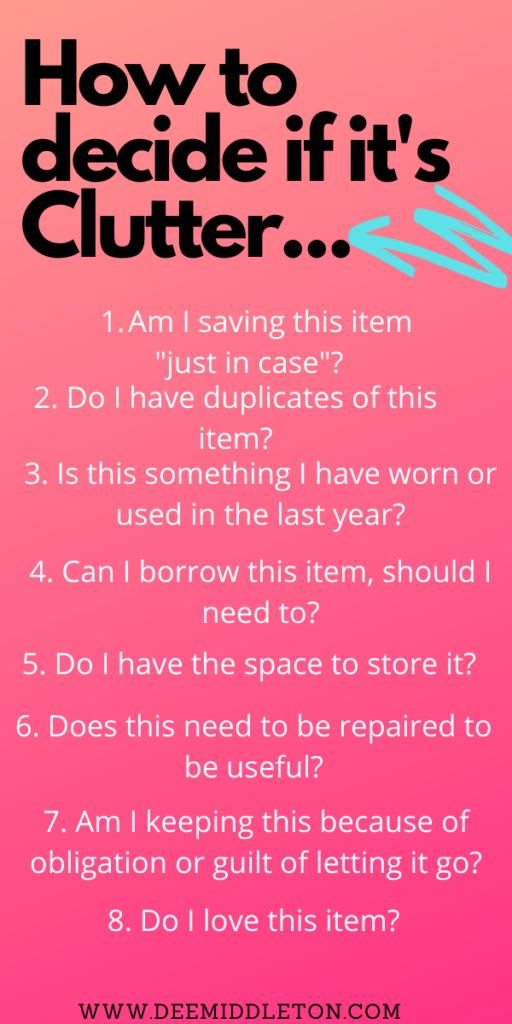
Struggling to decide if an item is clutter? Use these questions below to help you determine whether to keep or toss any item.
Need to deep clean? I have lists for you to guide you along.
My How to Deep Clean Your Kitchen list can be found here.
My How to Deep Clean Your Bathroom list can be found here.
My How to Deep Clean Your Kids’ Rooms list can be found here.
My How to Deep Clean Your Living Room list can be found here.
My How to Deep Clean Your Bedroom list can be found here.
Also, to keep up the general housework, you may need to create a daily housekeeping schedule that suits your specific needs. To do so, I have created a helpful series you can read here.
Need to Declutter Every room? I have declutter checklists for every room and every space in your home to guide you along below.
Also, you can get the complete digital printable copy of the Year Long Thorough Declutter Series Calendar and Checklists here. The printable digital download is delivered to your email. It includes 25 pages of printable calendar pages and checklists to help you declutter every room in your home. You can sign up here.
How to Declutter the Guest Room or Your Kid’s Room checklist can be found here.

How to Declutter Your Laundry Room and Patio checklist can be found here.
How to Declutter Your Coat Closet/Hall Closet/Linen Closet checklist can be found here.
How to Declutter Your Home Office checklist can be found here.

How to Declutter Your Attic checklist can be found here.
How to Declutter Your Garage checklist can be found here.
How to Declutter Your Living Room checklist can be found here.
How to Declutter Your Kitchen Checklist can be found here.

How to Declutter Your Entry/Foyer/Mudroom checklist can be found here.
How to Declutter Your Clothing checklist can be found here.
How to Declutter Your Bedroom checklist can be found here.
How to Declutter Your Bathroom checklist can be found here.

Happy Decluttering!
To Subscribe to this Declutter Series, drop me a comment below. Your email will be sent to me but will not be posted publicly. You’ll receive a daily declutter task via email for the daily task we are working on. You can unsubscribe at any time. Today’s task is to declutter old computers and computer equipment.
New to deemiddleton.com and don’t know where to start? I recommend going in this order:
Step 1: Check out this post on the 1st step you should take to get organized. If you don’t have a calendar, you can grab my free weekly printable calendar page here. It is in my shopify store, but it is totally free, so you won’t be prompted to put in any payment information. It is a free download and will be delivered straight to your email.
Also, you can get the complete digital printable copy of the Year Long Thorough Declutter Series Calendar and Checklists here. The printable digital download is delivered to your email. It includes 25 pages of printable calendar pages and checklists to help you declutter every room in your home. You can sign up here.
Step 2: Create a daily Housekeeping Schedule. You can use this series to start to set up your own schedule. You can also use this simplified weekly schedule.If you often ask: What is the fastest way to clean a dirty house? Or, if you struggle to get organized and have tried and failed time and again, you can likely find out which of these 11 reasons cause you to fail to get organized.
Step 3: How do you remove clutter? How Do You Declutter Your Home?.…Sign up for the Declutter Series and get your entire home decluttered in just 30 minutes a day, 5 days a week.”Declutter Your Home” checklists are provided in each email.
Step 4: What is the fastest way to clean a dirty house? Use a timer and use the Deep Cleaning Checklists above. They will help you get your home sparkling after you’ve decluttered.
Interested in becoming a full-time blogger like me? Check out my blogging series. At the top of every page on my blog, you’ll find a drop down menu. Just select the BLOGGING category.
Check out the most popular posts on deemiddleton.com:
14 Things That Make Your Home Look Cluttered
How to Create a Daily Housekeeping Schedule
How to Clean House When You Are Completely Overwhelmed By Clutter
What is Preventing You From Getting Organized?
Also, check out a great post on decluttering over here from becomingminimalist.com. Joshua Becker has some great tips on decluttering and minimalism.
For further reading, check out the fly lady here. She has some great cleaning and kitchen decluttering ideas plus excellent organization tips to get you started.
I hope you have benefitted from my post on how to declutter old computers. Leave a comment below to subscribe to my daily declutter task email series.

Recent Comments